When building products, clearly identifying and understanding the problem you’re solving is key. You set out with a vision, and you solve for the outcome. Clear and crisp use cases are what companies like ours are built on.
Our vision is that Scrintal is here together with Gobu to make learning, research, and writing smoother than ever, whether that’s citing directly in Word with our brand-new add-in or analyzing articles in your preferred language with our multilingual Article Analyses and Smart Summaries.
This blog post shows what’s new and answers some FAQ about Scrintal and Gobu.
What’s new ✨
🚀 Free Word add-in is Live!
Our free Word add-in was added to the Word add-in marketplace two weeks ago. It’s easy to install, and it even works with the free web version of Word. No need for a Gobu or Microsoft Word subscription! See how it works in our quick YouTube video below 👇 Try it out, we think you’ll love it!
The add-in turns Word into your personal research assistant. As the Scrintal and Gobu libraries are linked, instantly cite from your Scrintal library, ask questions about your saved articles, and keep your writing backed by solid references without ever leaving your document.
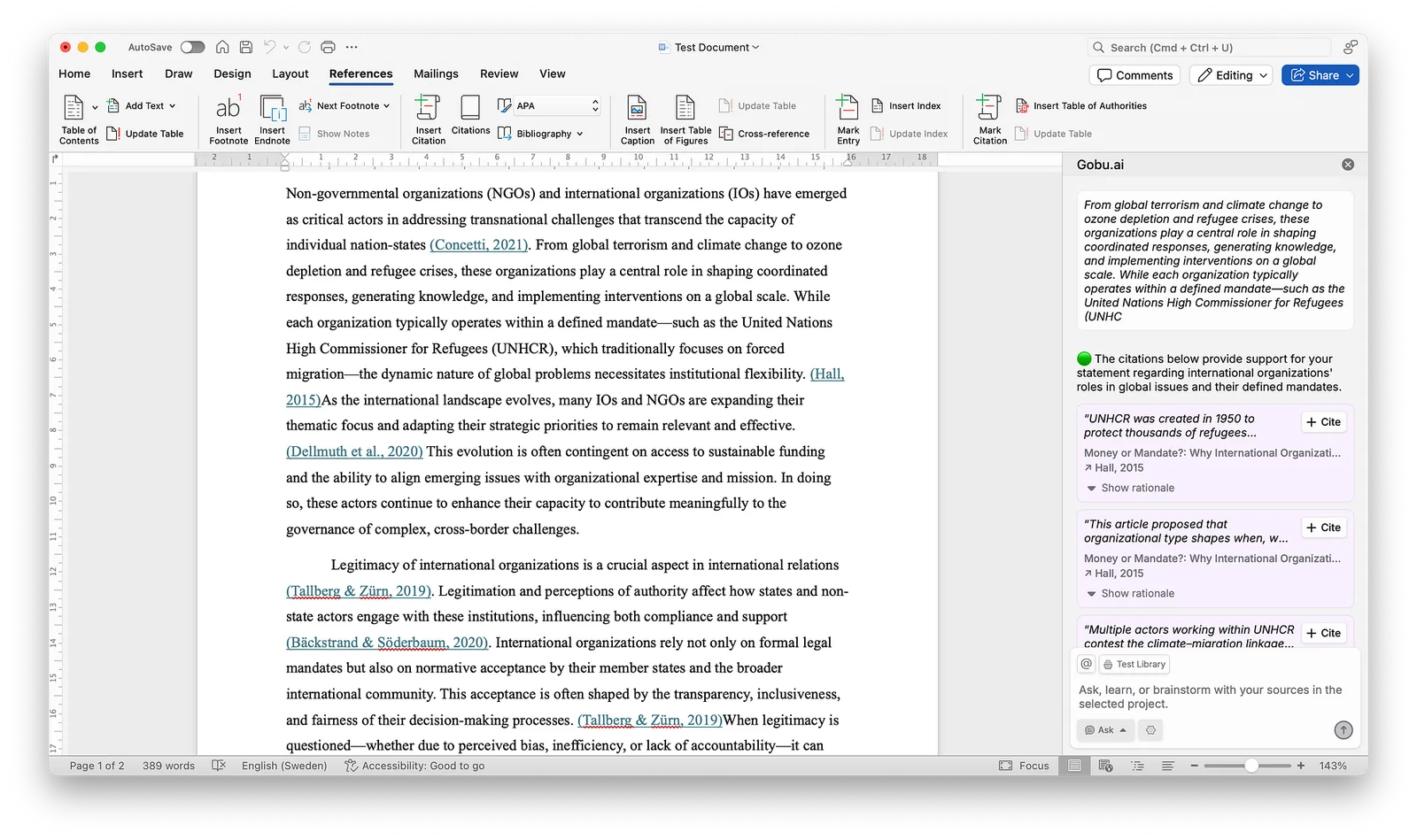
Gobu Word add-in in action
🌍 Article Analyses are now multi-lingual!
We’ve heard your feedback, and we’re excited to announce that you can now choose your preferred language for Smart Summaries and Article Analyses in Gobu! The Assistant will now also respond in the language that you use whenever you interact with it.
Go to: Account Settings > Appearance > Preferred Analysis Language
Languages added are Español, Italiano, Français, Deutsch, Svenska, Türkçe, Русский,日本語, 한국어, and 中文.
FAQ 💬
I’ve been in talks with many of our users, and I receive the same questions repeatedly. Many wonder why we launched a new product. They ask, “What will happen to Scrintal?” and “Should I be worried?”
The short answer is: Don’t worry. Scrintal is not going anywhere.
Q: Why is Gobu a separate product from Scrintal?
A: Scrintal has grown into a versatile tool that’s used in all kinds of ways we never imagined. To serve a more specific use case — factual writing for academics and researchers — we built Gobu as its own dedicated space. We felt that it wouldn’t have fit naturally into Scrintal without compromising the experience of both products.
Q: How is Gobu different than Scrintal?
A: While Scrintal is an open space where you can freely ideate and create on a canvas, Gobu is primarily an academic analysis and factual writing assistant.
You can install the Gobu Word add-in to cite articles from your very own library of knowledge, and even ask questions to your files. All from within Word, or Gobu’s standalone canvas and writing tools.
Q: Is Scrintal going away?
A: Not at all. Scrintal is and will be alive, and your work is completely safe. You can create just as you always have, and similar to before, you can export all your data at any time.
Q: What’s the plan going forward?
A: Scrintal and Gobu will continue to exist as two distinct products. If you log in to both products with the same email address, you can access the same archive in either platform. This makes it so easy to move between the platforms. If you are in a brainstorming and visual thinking mode, you can use Scrintal. When you need to read articles and write in Word, use Gobu and Gobu’s Word add-in — while always accessing the same archive of notes, files, and multimedia.
[1] Check out Gobu’s Free Word add-in
[2] See how Gobu works
[3] Check out Scrintal
Let’s build the best way to use AI in research and writing!